Nobody Needed a 2D Canvas Portfolio. I Built One Anyway
Why I built an infinite 2D canvas portfolio with 60 FPS rendering, placed my cat and motorcycle above Home, and engineered on-demand loading under 20KB.
Let’s be real: nobody on earth needs an infinite 2D canvas for a personal portfolio.
The standard playbook for developer websites is completely solved. You take a popular template, drop a hero section with a floating gradient, list four project cards, put a contact form at the bottom, and call it a day. It takes an afternoon, checks the corporate boxes, and nobody gets offended.
But where is the fun in doing what is sensible?
When I rebuilt ohya.sh, I didn’t want another digital resume frozen in glass. I wanted a tactile digital space. Something that feels like opening a map where you don't just scroll down a list—you explore an interconnected world.
Here is the story behind why this exists, and the deliberate engineering choices that make it surprisingly fast.
Smooth as Silk: 60 FPS Without Making Your Laptop Fan Scream
The biggest risk with "creative" or experimental websites is that they usually run terribly. You open the page, a 5MB 3D bundle starts downloading, your laptop fan spins up like a jet engine, and panning stutters along at 20 frames per second.
I refused to let that happen.
There is no Three.js, no WebGL, and no heavy canvas libraries running under the hood. Every card on this screen is a standard, lightweight HTML component.
To make it glide at a locked 60 FPS, the viewport is promoted directly to its own GPU compositor layer using hardware-accelerated transforms:
// GPU compositor layer panning — sub-16ms frame times
<div
  className="will-change-transform transition-transform duration-200 ease-out"
  style={{ transform: `translate3d(${viewport.x}px, ${viewport.y}px, 0)` }}
>
Because transforms bypass the browser's layout and paint cycles entirely, dragging across the screen or tapping arrow keys never drops a single frame.
The Logic of the Map: Work to the Right, Life to the Left, Cat on Top
An unbounded 2D space without rules is just chaos. So I organized the canvas around a simple mental model:
You can pan with your mouse, swipe on your phone, or simply tap your keyboard arrow keys to fly directly from one card to the next.
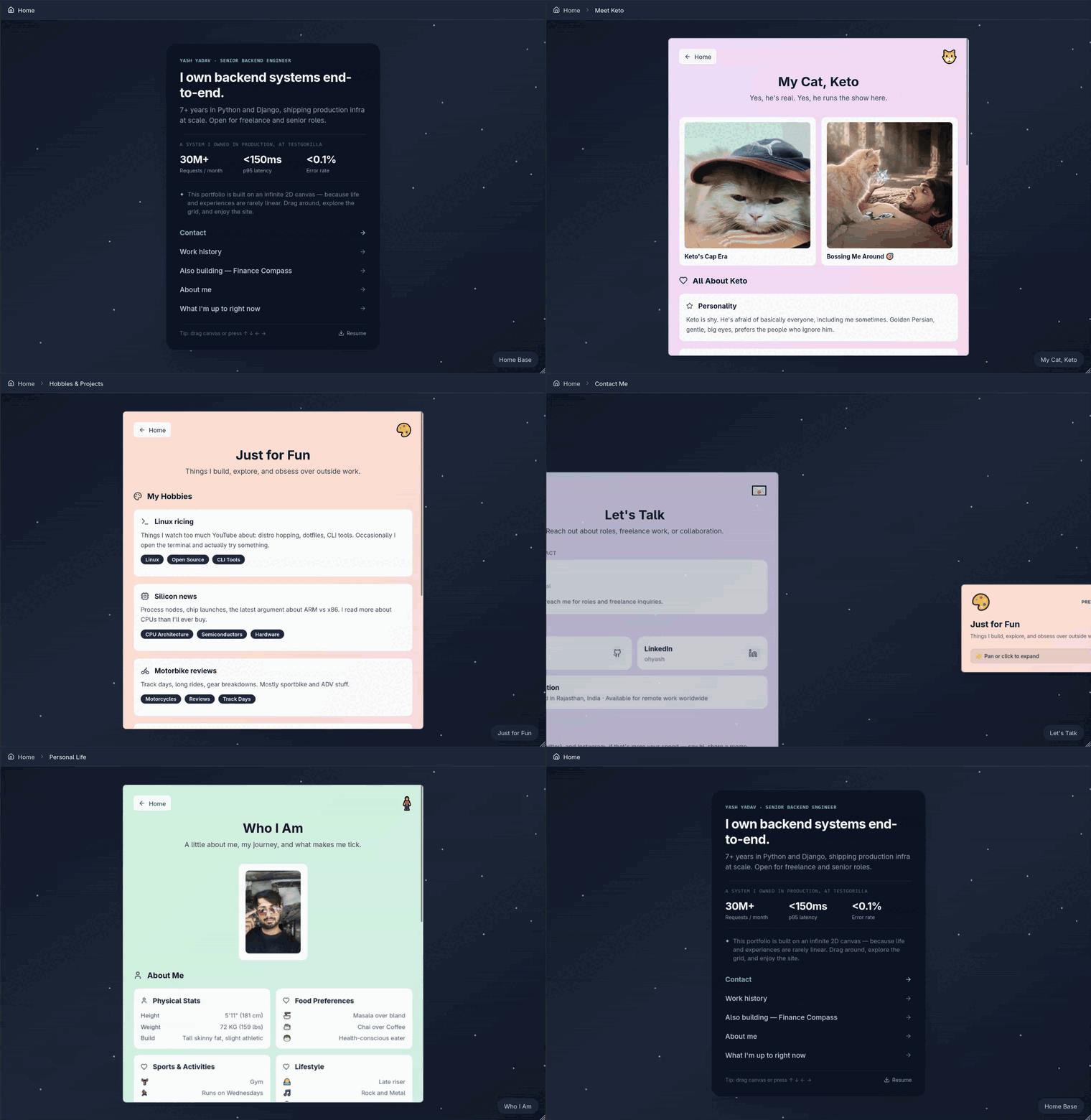
Infinite Space, Featherweight Size: Only Load What You Need (Under 20 KB)
You might think an infinite 2D canvas means your browser has to download the entire universe before you can see anything.
It doesn’t.
The website is engineered with on-demand proximity hydration:
No heavy data payloads, no waiting around for bloated bundles, and zero lag.
No Trackers, No Popups, No CMS Latency
The web has gotten cluttered with cookie popups, third-party tracking scripts, and slow content management systems. I wanted this space to be clean:
Why Do It?
Because building software should feel fun and alive.
A personal portfolio doesn't have to look like every other cookie-cutter template on the internet. It can be fast, playful, slightly over-engineered, and unapologetically distinct.